


This guide shows the process in seven steps, a prioritization table, an example from production and a checklist. The examples are invented.
Why patching in OT is different
In office IT the rule is: approve the update, roll it out, done. In a plant that rarely works, and for good reasons.
- Availability first: A controller that does not start up again after an update stops the line. A restart is often only possible during a shutdown.
- Vendor approval: Many machine and system vendors only support operation with approved versions of operating system, firmware and software. An unapproved update can cost you that support.
- Maintenance windows: Updates fit into planned shutdowns, and depending on the plant those come weekly, monthly or only once a year.
- Long lifecycles: Plants often run much longer than their operator stations receive vendor support. Some systems will never get another patch.
- Safety functions: For components with a safety function, any change can require a new assessment.
That is why "patch everything at once" is not the goal in OT. The goal is a clear process that produces a justified decision for every vulnerability: patch now, patch in the next window or protect the system another way.
What frameworks say
§ 30(2), no. 5 BSIG (German BSI Act) requires entities in scope to take security measures in the acquisition, development and maintenance of IT systems, components and processes, including vulnerability handling and disclosure. It is based on Art. 21(2)(e) NIS2 Directive. ISO/IEC 27001 covers the management of technical vulnerabilities in Annex A 8.8.
OT has its own part of the standards series: IEC TR 62443-2-3 is a technical report on patch management in industrial automation and control systems. It addresses both asset owners and product suppliers and describes how they work together to provide, check and install patches. The German BSI gives recommendations for operators of industrial control systems in its ICS-Security-Kompendium, and in the IT-Grundschutz Compendium the building block OPS.1.1.3 covers patch and change management.
Manufacturers of products with digital elements are also covered by the Cyber Resilience Act: Annex I, Part II CRA requires them to run a vulnerability handling process and provide security updates. As an operator you benefit, because for products placed on the market from 11 December 2027, advisories and updates will arrive more reliably.
The process in seven steps
- Inventory as the foundation. Without vendor, model and firmware version per device you cannot tell whether an advisory affects you. The OT asset inventory is therefore step one.
- Choose your sources. Subscribe to your vendors' security advisories, machine-readable in CSAF format where possible. Add the Known Exploited Vulnerabilities catalog (KEV) of the US agency CISA, the European Vulnerability Database (EUVD) of ENISA and the advisories of the German BSI.
- Check whether you are affected. Match every advisory against the model and version of your assets. Many advisories do not affect you at all, and you may record that with a reason.
- Assess and prioritize. What counts is not just severity, but also active exploitation, how reachable the system is and how important it is for the process.
- Approval and testing. Get approval from the machine or system vendor and test the update on a test system, a spare device or first on a less critical line.
- Deploy in the maintenance window. Schedule the update for a shutdown, back up project and configuration first and decide when you will roll back to the previous version.
- Document and verify. Record what was installed on which device and when, then check that the new version is in the inventory and the finding is closed.
Prioritization at a glance
The table is a suggestion. You set the deadlines yourself, in line with your maintenance windows and your risk assessment.
| Situation | Example | Approach |
|---|---|---|
| Actively exploited, system reachable | Listed in the KEV catalog, device with remote access | Close or restrict access at once, patch in the earliest possible window |
| Actively exploited, system well isolated | Controller in its own zone without outside connections | Verify the isolation, patch in the next regular window |
| High severity, no known exploitation | Vendor advisory on HMI software | Test as planned and install in the regular window |
| Low severity or only locally exploitable | Attack only possible with on-site access | Install with the next major update |
| No patch or no approval | Operator station without vendor support | Compensating measures, exception with an expiry date |
When no patch is possible
Many OT systems have no patch, no approval yet or no suitable maintenance window. Then you protect the system another way:
- Isolate: Put the system in its own zone and allow only the connections it needs.
- Control remote access: Close direct access paths and allow remote maintenance only through a controlled route.
- Reduce the attack surface: Turn off services and interfaces that are not needed, and lock USB ports.
- Allowlisting: Let only known programs run on operator stations.
- Monitor: Use OT monitoring to watch for unusual connections to exactly this system.
Record every such decision: which system, which vulnerability, which measures, who decided and how long the decision applies. An exception without an expiry date quickly becomes permanent.
Example from production
The example is invented. A plastic parts manufacturer receives an advisory on a firmware through a controller vendor's CSAF feed. The vulnerability is listed in the KEV catalog.
- Affected: Matching against the inventory shows twelve affected controllers from two model series. Three of them are reachable through a machine supplier's remote access.
- At once: Remote access to these three controllers is closed until the update. The supplier asks when needed and gets approval per session.
- Approval and test: For the first model series the vendor approves the new firmware. Maintenance tests it on a spare controller, with project and configuration backed up.
- Deployment: The update runs during the planned weekend shutdown. A rollback to the previous version is prepared but not needed.
- Without a patch: The second model series has no approval yet. Its controllers stay in their zone without outside connections, and the decision applies until the next review in three months.
What to document
- Source and date of the advisory
- Affected assets with firmware or software version
- Assessment and priority with reasoning
- Vendor approval and test result
- Date of installation, new version, person who did it
- For exceptions: measures, decision maker, expiry or review date
That way you answer an auditor's question about vulnerability handling with evidence instead of a description.
Checklist
- The OT asset inventory contains vendor, model and firmware version.
- Sources for vendor advisories are chosen and subscribed to.
- Every advisory is checked for whether it affects you.
- Priority takes active exploitation and reachability into account.
- Vendor approvals are obtained and documented.
- Updates are tested before installation.
- Maintenance windows and a rollback plan are set.
- Systems without a patch have compensating measures and a review date.
- Installed versions are updated in the inventory.
Patch management in Complass
Advisories by email, assessments in a spreadsheet and approvals in an inbox: that way everyone loses track. The vulnerability management module keeps it in one place:
- Matching against the inventory: The software and firmware of your assets is matched against NVD, CISA KEV, EPSS and ENISA EUVD. The data is mirrored on the server; your information does not leave the portal.
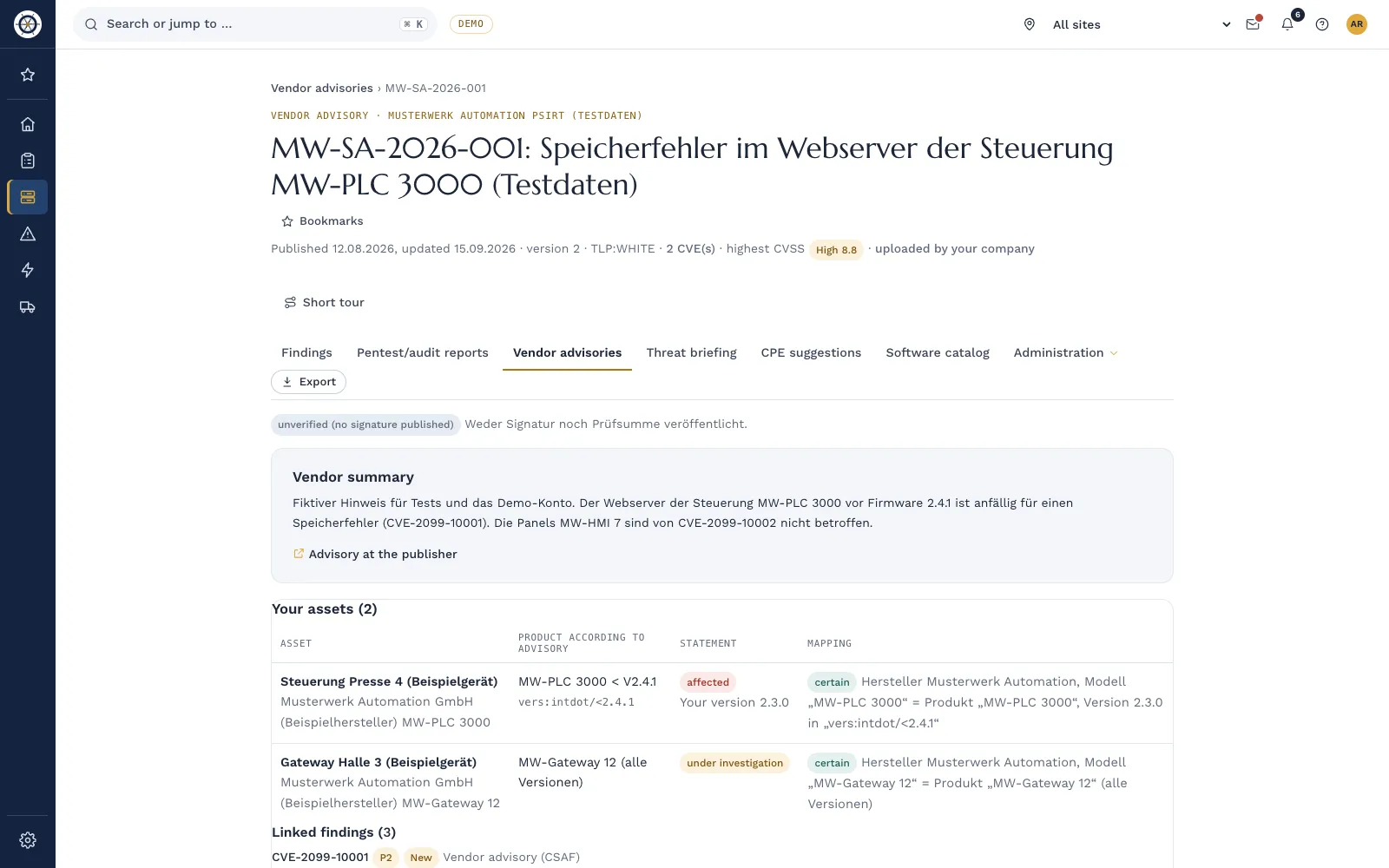
- Vendor advisories in CSAF format: You upload advisories or have them loaded from selected public feeds. Signature and checksum are verified, and matches on model and firmware version become findings with the vendor's measures.
- Priority with reasoning: P1 to P4 from severity, exposure, criticality, active exploitation and EPSS, each with a deadline.
- Into the action plan: You add recommended measures as a task with one click.
- Decisions with an end date: A risk acceptance always has an end date. You mark systems without vendor support as "operated deliberately, compensated", with measures and a review date.
Frequently asked questions
Do we have to install every patch at once?
No. What matters is a justified decision for each vulnerability. Actively exploited vulnerabilities on reachable systems come first; others can wait for the next regular maintenance window.
What if the machine vendor does not approve an update?
Ask for a date for the approval and protect the system with compensating measures until then. Record the decision with a review date. For new plants, approval of security updates belongs in the supply contract.
Is antivirus enough instead of patches?
No. Antivirus or allowlisting lower the risk but do not close a vulnerability. They are a compensating measure, not a replacement for an update that is available and approved.
What is CSAF and why does it help?
CSAF is an open, machine-readable format for security advisories. With CSAF an advisory can be matched automatically against the model and version of your assets instead of reading PDF advisories by hand.
Who is responsible for patching in OT?
Usually maintenance or control engineering, because they know the plant and the shutdowns. OT security assesses and monitors, and production agrees the maintenance windows.
In a demo we use the demo company to show you how a vendor advisory becomes an assessed finding with a task and a deadline.
Request a demo Try it for 14 days
Read more
- Guide "Building an OT asset inventory in six steps"
- Guide "Zones and conduits in IEC 62443 explained"
- Guide "Securing OT remote access: seven building blocks"
- Guide "CRA: vulnerability handling and CSAF"
- Vulnerability management: find, prioritize and work through vulnerabilities
- IEC 62443 in Complass
Not legal advice. This guide gives a general overview and does not replace an assessment of the individual case. The current wording of the BSIG and the CRA and your licensed editions of the standards are authoritative. As of November 2026.