

This guide explains both terms and shows how to partition a plant in six steps. It also includes an invented example, common mistakes and a checklist.
The picture behind it
Imagine a factory hall with fire compartments. The compartments are the zones, and the doors between them are the conduits. Who may pass through a door is regulated, and what happens in one compartment stays there as far as possible. The picture is our own comparison; the standard does not use it.
| Question | Zone | Conduit |
|---|---|---|
| What is it? | Group of assets with the same security requirements | The communication channels between zones, taken together |
| What belongs to it? | Controllers, operator panels, servers, network devices | Protocols, ports, direction and protection mechanisms |
| What does it look like in the plant? | Line, control system, safety, OT DMZ | Firewall rules, VPN, data diode |
| What is defined? | Boundaries, assets, access points, owners, SL-T | Connected zones, channels, mechanisms, owners, SL-T |
So a conduit is not simply a cable. It is the described, permitted connection together with its protection.
What you gain
- Limited spread. An incident in one zone reaches other zones only through defined paths.
- Fitting requirements. Each zone gets the level of protection its risk calls for, rather than one rule for the whole plant.
- Room for legacy systems. You protect systems that cannot be hardened through a zone of their own with tight rules.
- A shared language. Management, operations and integrators see on one plan how the plant is structured.
The separations the standard names
IEC 62443-3-2 names five separations explicitly. ZCR 3.2 and 3.3 are binding, ZCR 3.4 to 3.6 are worded as recommendations. It is best to adopt all five as minimum rules.
| ZCR | What is separated | Examples |
|---|---|---|
| 3.2 | Enterprise IT and automation | Office network, ERP and email do not belong in an OT zone |
| 3.3 | Safety-related assets | Safety controllers get a zone of their own |
| 3.4 | Temporarily connected devices | Service laptops, diagnostic PCs, programming devices |
| 3.5 | Wireless devices | Wireless operator devices, radio sensors, automated guided vehicles |
| 3.6 | Devices connected via external networks | Remote maintenance, outstations over mobile networks, cloud links |
If a safety system cannot be separated, the entire zone counts as safety-related.
You choose further criteria yourself and record them with your reasons:
- Criticality. Do not mix highly critical parts of the plant with uncritical ones.
- Function. For example per production line or process section.
- Responsibility. Draw sensible boundaries around plants run by an external service provider.
- Life cycle. Keep legacy systems apart from modern systems that can be hardened.
- Location. Buildings, control room, outstations.
What about the Purdue model?
The Purdue model arranges a plant in levels from field device to enterprise IT. It is a good starting point and, according to the BSI, the basis of many concepts for segmentation and communication flows.
Level 3.5, the OT DMZ, separates office IT and production. Data travels through systems in the DMZ, and ideally the better protected side opens the connection. This is common practice, but not a requirement of the standard.
The model does not replace a risk-based partition. Zones follow risk and function, not just levels.
Six steps to a zone model
- Set the criteria. Agree on the separations from the standard and your own criteria before you draw.
- Assign the assets. Every asset from the inventory goes into exactly one zone. Remember switches, firewalls and time servers too, often in a management zone of their own.
- Describe the zones. For each zone record the identifier, logical and physical boundaries, assets, access points and owners. Stable identifiers such as Z-01 can be reused in firewall rules and tickets.
- Check the data flows. Ask for each connection: is it operationally necessary? Many date from commissioning and are no longer needed.
- Define the conduits. Assign every necessary data flow to a conduit and describe protocol, port, direction and protection mechanism so concretely that a firewall rule set can be derived from it.
- Draw and agree. A one-page overview shows zones, conduits and identifiers. Agree it with operations and automation and keep it under change control.
Example: a company with two lines
This example is invented. The model of a mid-sized manufacturer could look like this:
| Zone | Contents |
|---|---|
| Z-01 Office | Office IT, ERP, email (outside the system considered) |
| Z-02 OT DMZ | Historian copy, patch server, jump server, exchange server |
| Z-03 Control system | SCADA servers, control room HMIs |
| Z-04 Engineering | Engineering stations |
| Z-05 and Z-06 Lines | Controllers, drives and operator panels per line |
| Z-07 Safety | Safety controllers |
| Z-08 Remote maintenance | Access for external service providers |
These conduits could go with it, for example:
| Conduit | Connection | Allowed |
|---|---|---|
| C-01 | Office and OT DMZ | Report queries on the historian copy |
| C-02 | OT DMZ and control system | Replication out of the OT, updates |
| C-03 | Control system and line 1 | Polling the controllers over OPC UA |
| C-04 | Engineering and lines | Programming access, only when needed and logged |
| C-05 | Remote maintenance and OT DMZ | VPN access with MFA |
What matters is what is missing: there is no conduit from Z-01 directly into a control zone.
Common mistakes
- One big OT zone. It separates IT and OT but does not limit spread within production.
- Too many zones. Every zone costs documentation, rules and operating effort.
- Rules without a purpose. Open rules between OT zones are convenient, but every rule needs a documented reason.
- Overlooking multi-homed devices. A system with two network cards can bypass the separation.
- A laptop with internet access in the line zone. It lowers the protection level of the entire zone.
Checklist
- Criteria for the partition are documented and justified
- Every asset belongs to exactly one zone
- Enterprise IT, safety, wireless, service and remote access are considered separately
- Every necessary data flow belongs to a conduit
- Connections no longer needed are marked for removal
- Multi-homed devices are assessed
- There is no direct connection from enterprise IT into control zones
- The drawing is agreed and versioned
Zones and conduits in Complass
Maintaining a zone model in a drawing and a spreadsheet means entering every change in several places. In Complass it grows out of the shared asset inventory:
- Zone proposal. Complass proposes zones from subnets, VLANs and observed connections. You decide what is taken over.
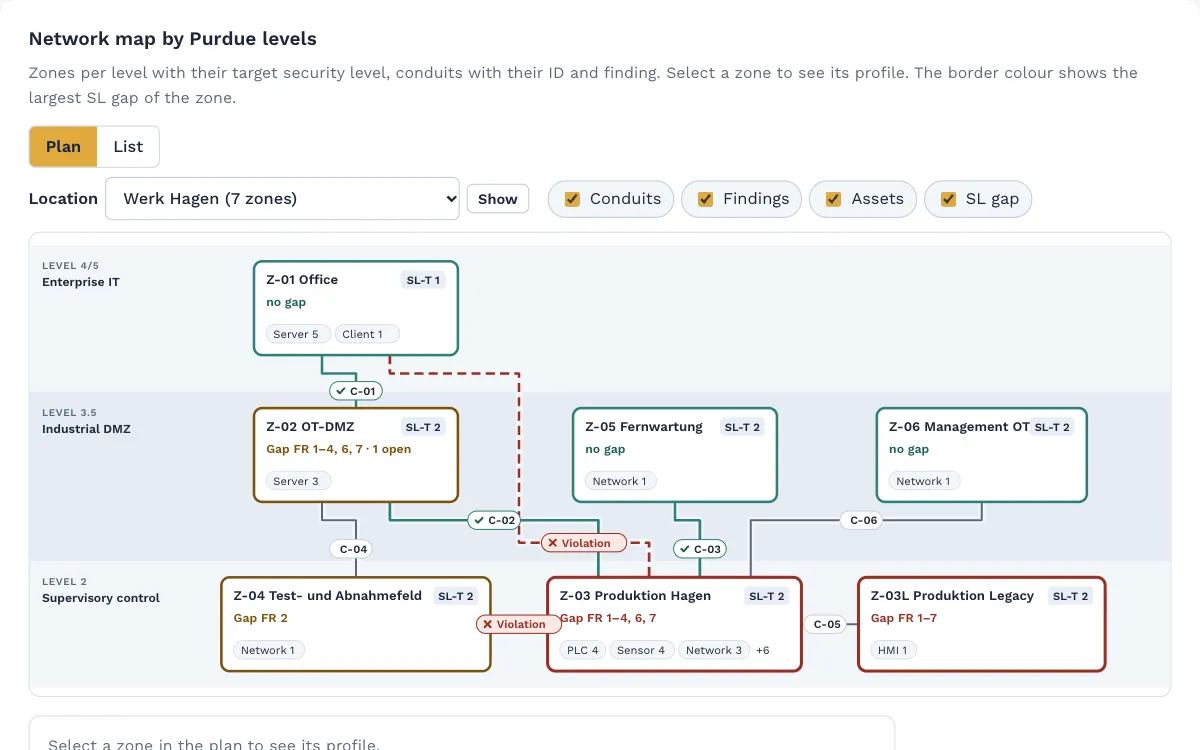
- Network map. The map shows every zone in its Purdue level and the conduit with its identifier for each pair of zones. You can download it as SVG.
- Conduit rules. For each conduit you set the transport, port or port range, and optionally protocol and direction.
- Check against the traffic. The portal compares observed flows with the rules and shows violations and deviations. You can release a flow for a limited time with a reason and an expiry date.
- Partition notes. The portal flags when, for example, assets with a safety function, wireless devices, or enterprise IT and control technology sit in the same zone. You can create a task from this.
- Documents in place. Network plans, firewall exports or approvals are attached directly to the zone or conduit.
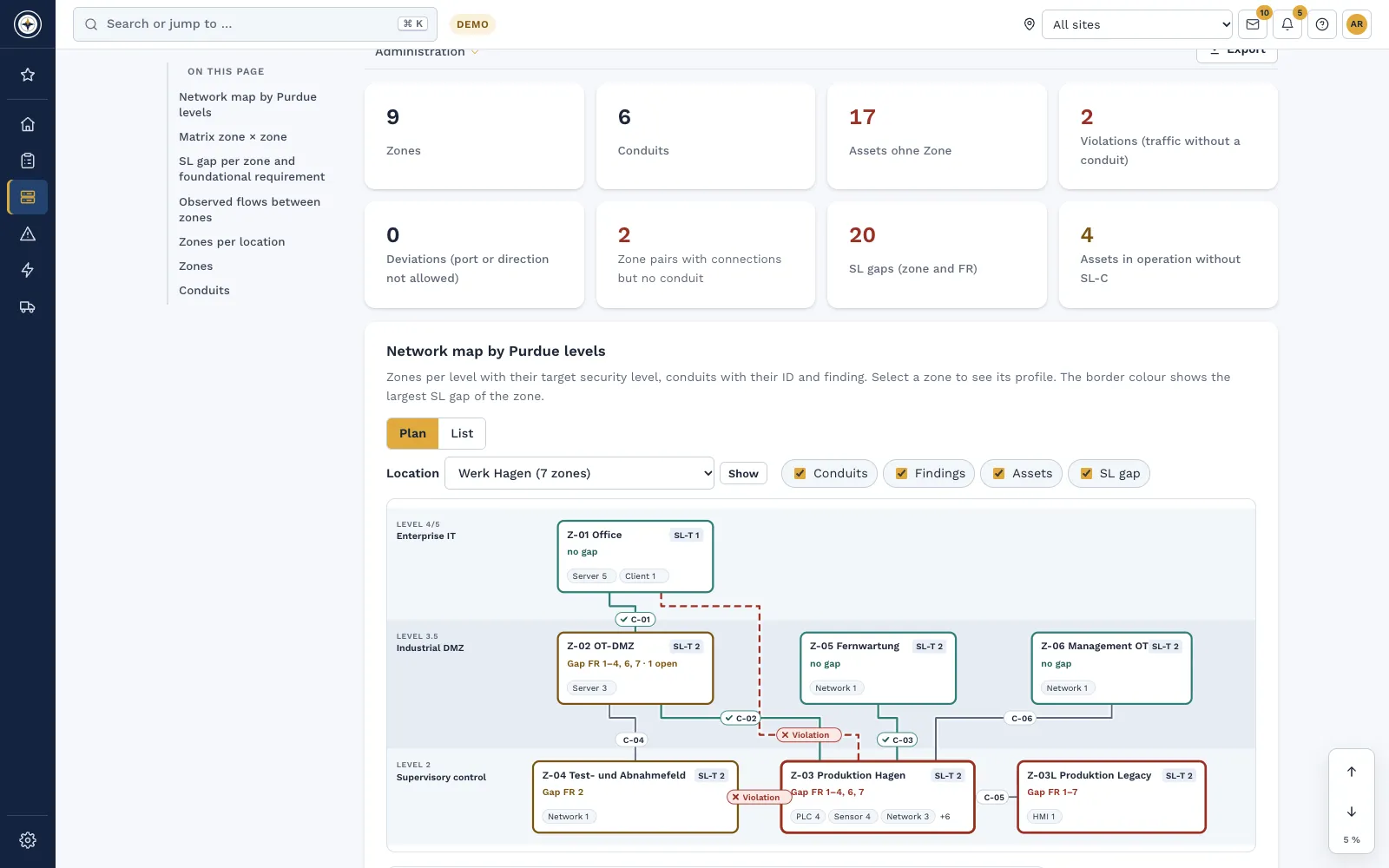
With a booked IEC 62443 module you also get the zone assessment and the SL gap per zone.
Frequently asked questions
How many zones make sense?
There is no one-size-fits-all answer. What matters is that every zone has a reason and that you can maintain it in operation.
Can an asset sit in several zones?
No, assign each asset to exactly one zone. Multi-homed devices are a warning sign: remove the connection or document it as a conduit.
Is every VLAN a zone?
No. A VLAN is a technical means, while a zone is a group of assets with the same security requirements. Existing VLANs are only a starting point.
Is a firewall between IT and OT enough?
It covers only the first separation. Everything inside production then stays in one zone, and an incident can spread sideways there.
In a demo we show you how your inventory becomes a zone model with a network map.
Request a demo Try it for 14 days
Read more
- Whitepaper "IEC 62443 for asset owners, integrators and manufacturers"
- IEC 62443 in Complass: from system under consideration to security programme
- Guide: IEC 62443-3-2: risk assessment step by step
- Asset management: inventory, zones and conduits
Not legal advice. This guide gives a general overview and does not replace an assessment of the individual case. The wording of your licensed copy of the standard is authoritative.