

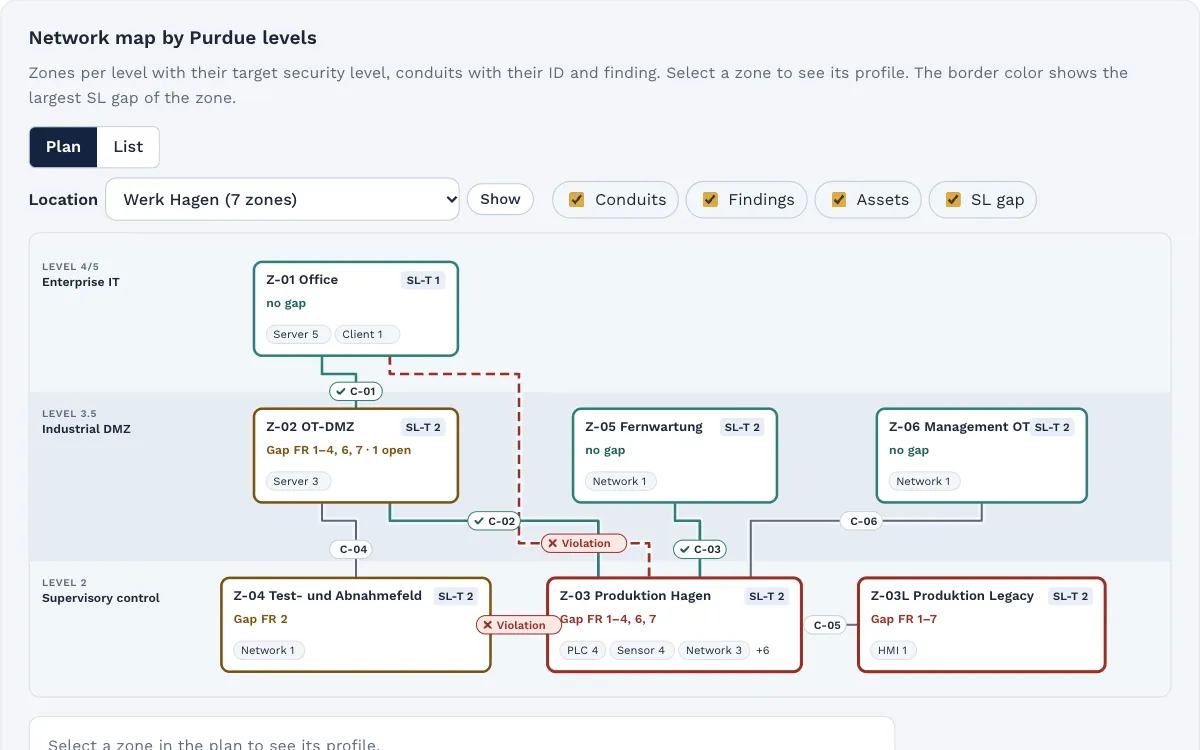
This guide shows the seven building blocks in the order you can put them in place, compares the usual access paths and lists what belongs in the contract. The examples are invented.
Why remote access needs its own rules
Remote maintenance saves trips and shortens downtime. In return, the plant needs a path from outside to inside, and that is exactly the path attackers look for. The German Federal Office for Information Security (BSI) lists intrusion via remote maintenance access in its "Industrial Control System Security: Top 10 threats and countermeasures" (BSI-CS 005, 2022 edition) and has a dedicated recommendation on the topic: "Fernwartung im industriellen Umfeld" (remote maintenance in industrial environments, BSI-CS 108, version 2.0).
The frameworks address it too:
- NIS2 and the BSIG: § 30(2) BSIG (German BSI Act) requires, among other things, supply chain security (no. 4), access control concepts (no. 9) and multi-factor authentication solutions (no. 10). The basis is Art. 21(2)(d), (i) and (j) NIS2 Directive.
- IEC 62443: A remote access path is a conduit, that is, a described and permitted connection between zones together with its protection. IEC 62443-3-3 treats access via untrusted networks and the termination of sessions as separate system requirements (SR 1.13, SR 2.6). IEC 62443-2-4 has its own requirement group on remote access for service providers (SP.07).
- IT-Grundschutz: The BSI module OPS.1.2.5 "Fernwartung" (remote maintenance) describes requirements for planning, running and securing remote maintenance and is available free of charge from the BSI. For the plants themselves, the BSI ICS Security Compendium sets the frame.
The seven building blocks
- Record every access path. List every way someone from outside reaches your plants: modems and cellular routers in control cabinets, vendor VPN boxes, remote maintenance portals, remote control software on operator stations. Many of them appear in no network diagram. The site walk for the asset inventory finds them most reliably.
- Create one central entry point. External parties reach the plant only through a jump server in an OT DMZ, not directly through a modem on the machine. From the jump server, the firewall allows only the targets and protocols that each service provider needs.
- Personal accounts and MFA. Every technician has their own account, no shared service accounts. Sign-in requires a second factor. When a technician leaves the service provider, their account is disabled.
- Approval per session. An access that has been set up is not a standing permission. Someone in operations approves each session, for example with a key switch, an approval in the portal or an unlock on the jump server. Before that, they check: Is there a work order? Who is on the other end? What will be done?
- Time limits. The session ends by itself after the job or after a set time. The permission itself is also time-limited and reviewed regularly.
- Logging and recording. Start, end, person, target and purpose of every session are recorded. For critical plants, the jump server records the session so you can trace later what was changed.
- Contractual rules. The contract with the machine builder or service provider sets out which path they use and what their duties are. More on this below.
Access paths compared
| Access path | Typical picture | Common weakness | What you settle |
|---|---|---|---|
| Modem or cellular router on the machine | Supplied with it, built into the cabinet | Bypasses firewall and monitoring, often reachable at all times | Switch it off or put it behind the central entry point, otherwise key switch and on-site approval |
| Vendor VPN box | Separate hardware per supplier | Many parallel paths, configuration held by the vendor | Place it in the OT DMZ, limit targets by firewall, approve each session |
| Vendor remote maintenance portal or cloud | Outbound connection from a gateway | Approval and logs sit with the vendor | Check whether you can approve sessions and see the logs |
| Central jump server in the OT DMZ | One entrance for all external parties | Becomes a valuable target if poorly maintained | Harden, patch, MFA, recording, own zone |
A jump server does not solve everything. It does, however, bundle the paths in one place, where you set up accounts, MFA, approval and logging once instead of separately for every supplier.
Think of remote access as a conduit
If you plan zones and conduits under IEC 62443, treat remote access like any other connection. The jump server sits in its own zone, the OT DMZ. The connection from there to the line is a conduit with defined targets, protocols and protection mechanisms. This shows at a glance which zone can be reached from outside and which security level the path to it has to achieve.
If a device with its own remote access sits in the middle of a production zone, that is a sign to sharpen the zones.
What belongs in the contract
Suppliers with remote access are among your critical suppliers. At a minimum, agree with them on:
- Access path: only through the access you provide, no modems or remote control software of their own.
- People: personal accounts, notice when a technician leaves.
- Procedure: every session announced with a work order, approved by you, signed off when done.
- Protection on their side: maintained and protected technician devices, handling of credentials.
- Incidents: prompt notice if something happens at the service provider that affects your access.
- Evidence: information on request, for example through a questionnaire, and cooperation in audits.
IEC 62443-2-4 describes what you can expect from service providers. A reference to it in the contract gives both sides a common language.
Example from production
The example is invented. A plastics processor with three halls has its injection molding machines maintained by five machine builders. During the survey, maintenance finds seven access paths: four cellular routers, two VPN boxes and remote control software on an operator station that a technician set up years ago.
- Right away: The remote control software is removed, the routers get key switches, and the shift lead holds the key.
- Within three months: A jump server in the OT DMZ replaces the routers for four of the five suppliers. Every technician has a personal account with MFA.
- One exception: One supplier does not support MFA. Their access stays as a time-limited exception with a reason and an end date until they upgrade.
- After that: Every session is requested, approved and logged. Every six months, the OT lead checks which accesses are still needed.
Checklist
- All remote access paths are recorded, including modems, routers and remote control software.
- Every access has a responsible person in the company.
- External parties enter the plant through a central entry point in an OT DMZ.
- Every technician has a personal account, and sign-in uses MFA.
- Every session is approved by operations before it starts.
- Sessions and permissions are time-limited.
- Start, end, person and purpose of every session are logged.
- Exceptions, such as access without MFA, have a reason and an end date.
- Contracts cover access path, people, procedure, incidents and evidence.
- Accesses are reviewed regularly, and those no longer needed are ended.
Remote access in Complass
Complass does not replace the jump server. It replaces the spreadsheet and the email thread that today record who may come in from outside and when:
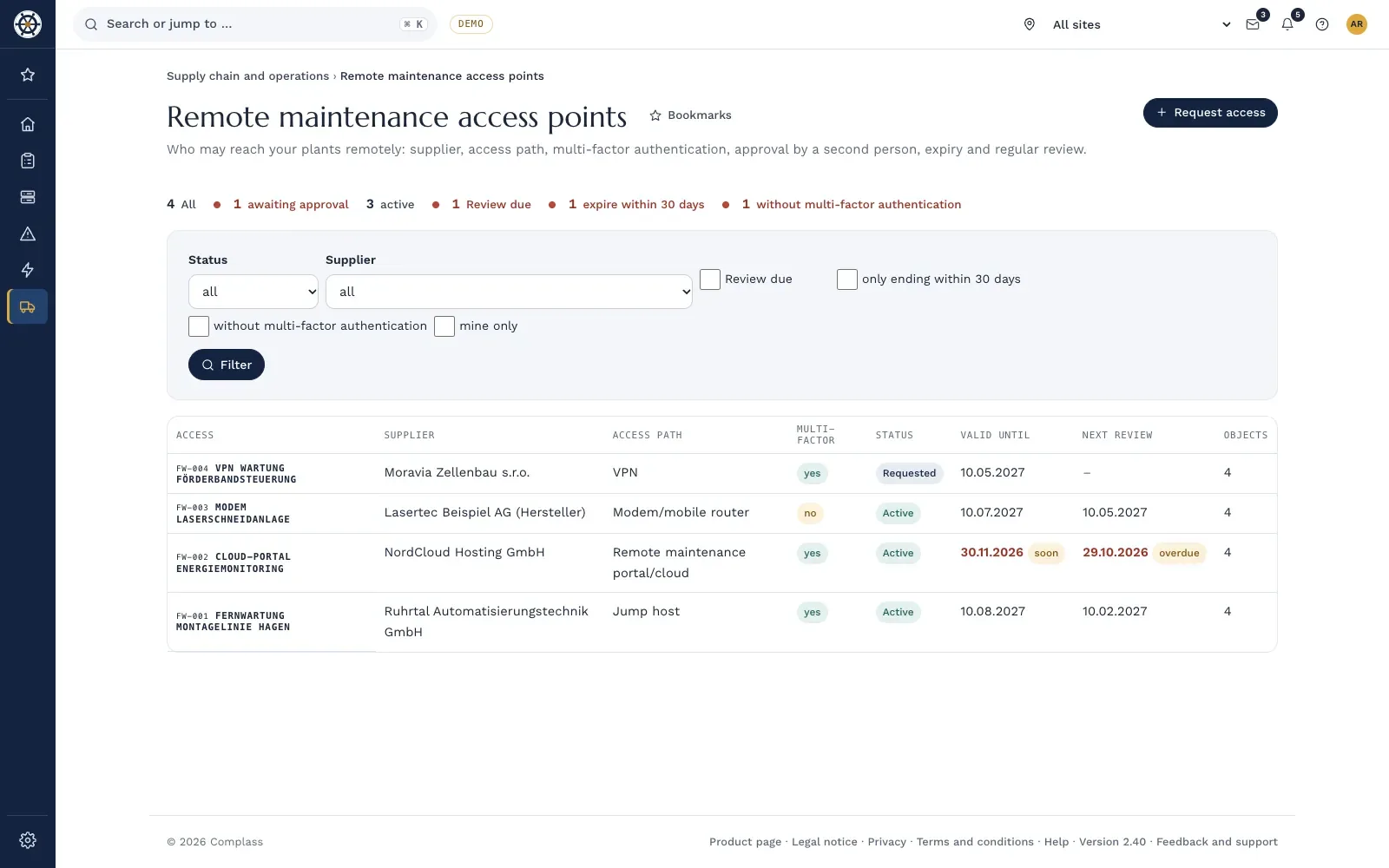
- Register of remote accesses: For each access, supplier, purpose, access path, MFA, responsible person and the plants and zones it reaches sit in one place. You record whether the access is reachable at all times or unlocked per job only.
- Four-eyes approval: An access is requested and approved by a second person, who confirms again with their second factor, never by the person who requested it.
- Time-limited and reviewed: Every access is valid for at most twelve months. Complass reminds you before it expires and before each review and documents every outcome.
- Zones in view: The zone check points out when assets with remote access sit in a zone next to other assets.
- Suppliers: A supplier with remote access to OT gets at least the criticality "high" as a suggestion in the classification.
Frequently asked questions
Is a VPN with a password enough?
For OT, usually not. § 30(2), no. 10 BSIG names multi-factor authentication or continuous authentication solutions explicitly, and a shared password cannot be traced to a person. Where MFA is not yet technically possible, record that as a time-limited exception with compensating measures.
Do we have to run every access ourselves?
No. A vendor's remote maintenance portal can fit if you can approve sessions, see the logs and end the access at any time. Clarify this before you buy the machine.
What about the modem that came with the machine?
Record it and decide deliberately. Either it is switched off and replaced by the central entry point, or it stays in service with a key switch, on-site approval and logging. A modem that is always reachable and covered by no rule is the worst option.
Do sessions have to be recorded?
The sources named here do not require this across the board. You should log every session. Recording pays off for critical plants and for changes to control programs.
Who approves the session?
Someone who knows the plant and is on site, usually the shift lead or maintenance. What matters is that it is settled beforehand who may do this, and that in case of doubt someone calls back on the known number from the maintenance contract.
In a demo we use the demo company to show you how remote accesses are requested, approved and reviewed.
Request a demo Try it for 14 days
Read more
- Guide "Zones and conduits in IEC 62443 explained"
- Guide "Building an OT asset inventory in six steps"
- Guide "NIS2 supplier assessment with questionnaire"
- Guide "Security levels in IEC 62443 explained"
- Supplier management in Complass
Not legal advice. This guide gives a general overview and does not replace an assessment of the individual case. The current wording of the BSIG and the NIS2 Directive, the BSI publications and your licensed editions of the standards are authoritative. As of November 2026.