


Existing spreadsheets come in by import, and Excel stays available for exports. This guide shows where spreadsheets and inboxes reach their limits, how the same work runs in Complass and what you need for the switch.
What NIS2 means day to day
NIS2 is EU Directive (EU) 2022/2555. In Germany it is transposed by the NIS2 Implementation and Cybersecurity Strengthening Act (NIS2UmsuCG), mainly through the BSI Act (BSIG). For entities in scope this results in four areas of work:
- Registration with the BSI (§ 33 BSIG).
- Risk management measures, implemented and evidenced, including supply chain security (§ 30 BSIG).
- Reporting significant incidents in several stages (§ 32 BSIG).
- Management responsibility: resolving on the measures, overseeing their implementation and taking part in training regularly (§ 38 BSIG).
Most of this is not a one-off task. Measures are reviewed, evidence is renewed, suppliers are assessed and new incidents are checked. That is where a tool shows whether it carries the daily work.
Where Excel and email reach their limits
For a first inventory a spreadsheet is a good start. It gets difficult as soon as several people work on it, evidence comes in and the work is meant to run for years:
- Versions: the list goes out by email, is edited and comes back. Afterwards there are several copies, and who changed what and when is hard to trace.
- Evidence: policies, records and certificates sit in folders and inboxes. The link between a requirement and its evidence is only a file name in a cell, and an expired certificate is noticed only when someone asks for it.
- Responsibilities: an "owner" column reminds nobody of a due date. Reminders, questions and approvals run through single emails that only the people involved can see.
- Supplier assessments: questionnaires go out as attachments and come back in different versions. You merge answers and evidence by hand and follow up one by one.
- Incident reporting chain: after a security incident you have to decide quickly and with reasons whether it must be reported, and every reporting stage has its own deadline. In a spreadsheet you track the check, the deadlines and the state of every report yourself.
This is not a flaw of the spreadsheet. Spreadsheets are made for numbers and lists, not for responsibilities, approvals and evidence over several years.
The difference at a glance:
| Topic | Excel and email | Complass |
|---|---|---|
| Versions | Several copies in inboxes and folders | One valid state with a history of changes |
| Evidence | File name or path in a cell | Evidence file on the requirement, with expiry date and reminder |
| Responsibility | "Owner" column without reminders | Task with owner, email reminder and approval |
| Suppliers | Questionnaire as an email attachment | Self-assessment in the supplier portal, with evidence |
| Incidents | Tracking the check and deadlines yourself | Guided check of the reporting duty with calculated deadlines |
How the same work runs in Complass
- Clarify applicability. The free applicability check gives a first assessment. In the NIS2 module the first phase guides you through assignment, size thresholds, group structures and special regimes, with a justification for your records.
- Bring in what you have. The state of your measures (applicability, justification, status, evidence, owner, review cycle) and your list of policies are imported from Excel or CSV, with a preview before anything is taken over. Asset lists and action plans come in the same way.
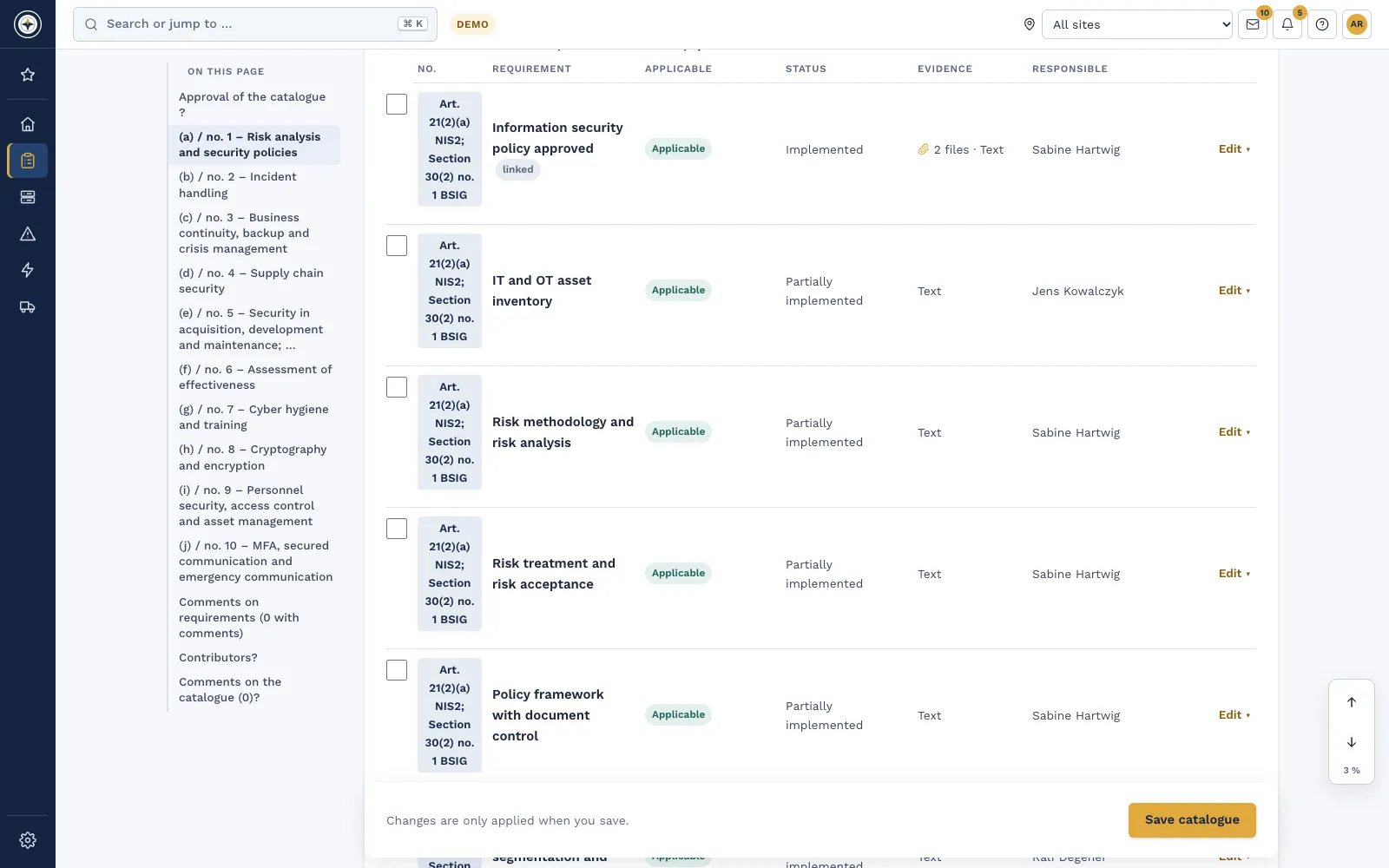
- Keep the measures in the catalogue. The catalogue for § 30 BSIG and Art. 21 NIS2 Directive shows every minimum measure with applicability, status and evidence, plus an owner and a review cycle. Link it with ISO/IEC 27001 and the evidence counts for both frameworks.
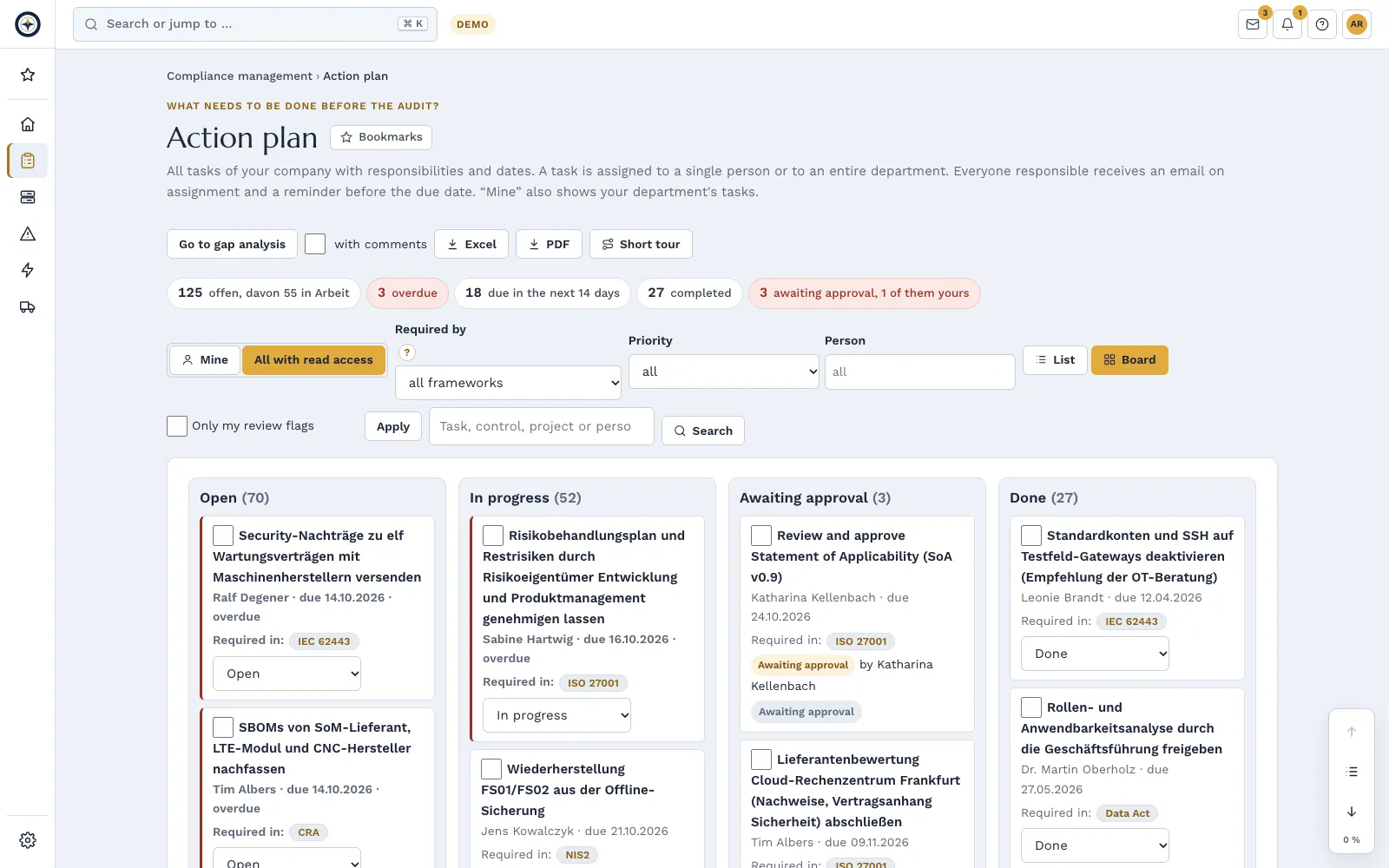
- Tasks with owners and due dates. Gaps become tasks with owners, due dates and email reminders, recurring if needed. A finished task can go to a second person for approval. All due dates are in one list, also as a calendar subscription in Outlook, Apple or Google.
- Documents and evidence with versions. Templates with filling guidance go through draft, review and approval and keep their versions. A second person reviews evidence files. Certificates and test reports carry an expiry date, and Complass reminds you in time.
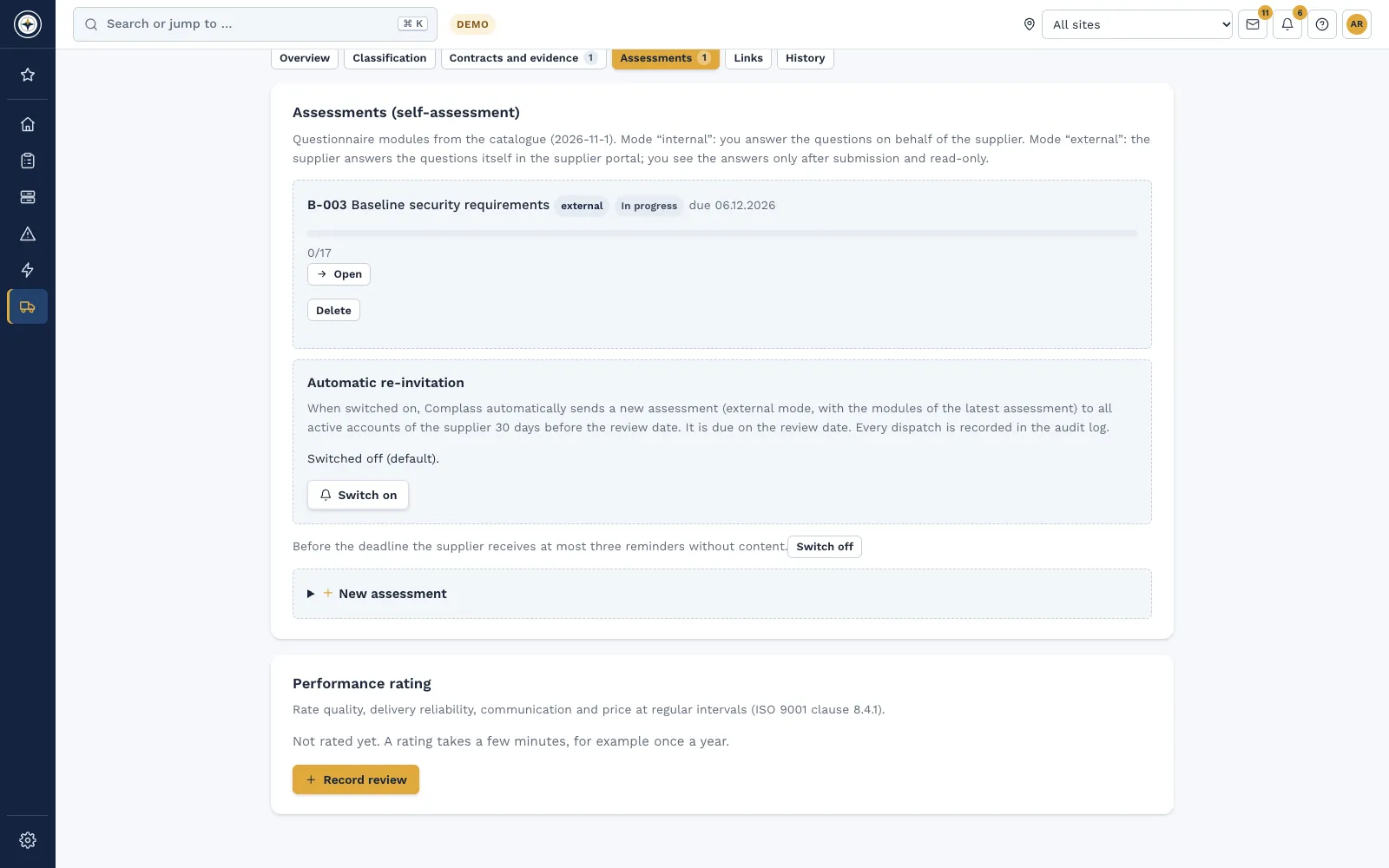
- Suppliers take part. You classify suppliers and invite them to a self-assessment. The supplier answers in its own free account and uploads evidence. You review every answer and ask for more where needed; gaps become measures with a due date or risks.
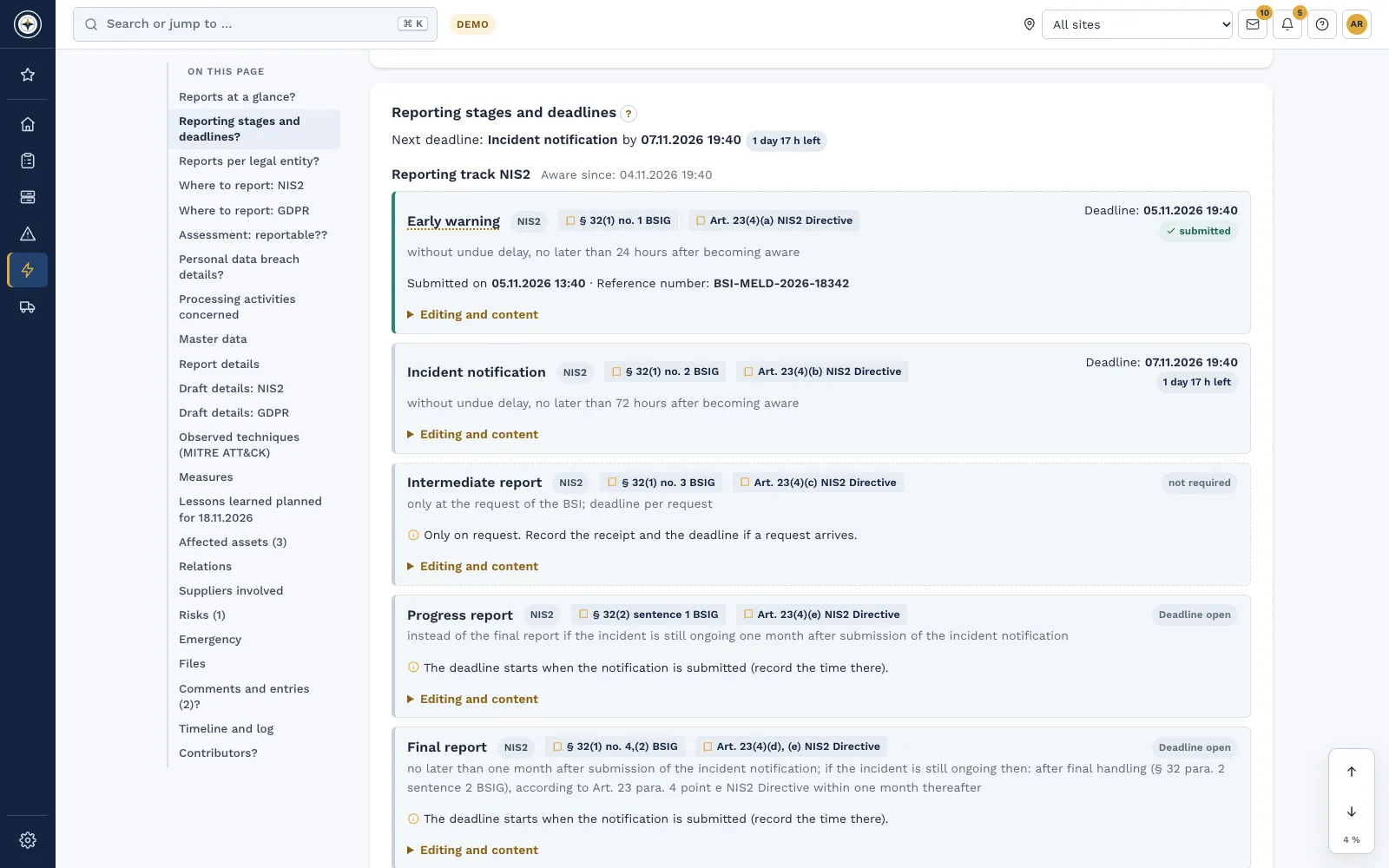
- Check incidents with guidance. Check questions from the legal text lead to the decision "reportable or not", with a justification for your records. The reporting stages under § 32 BSIG appear with their calculated deadline, and you prepare the content per stage. You submit the report itself in the authority's reporting portal.
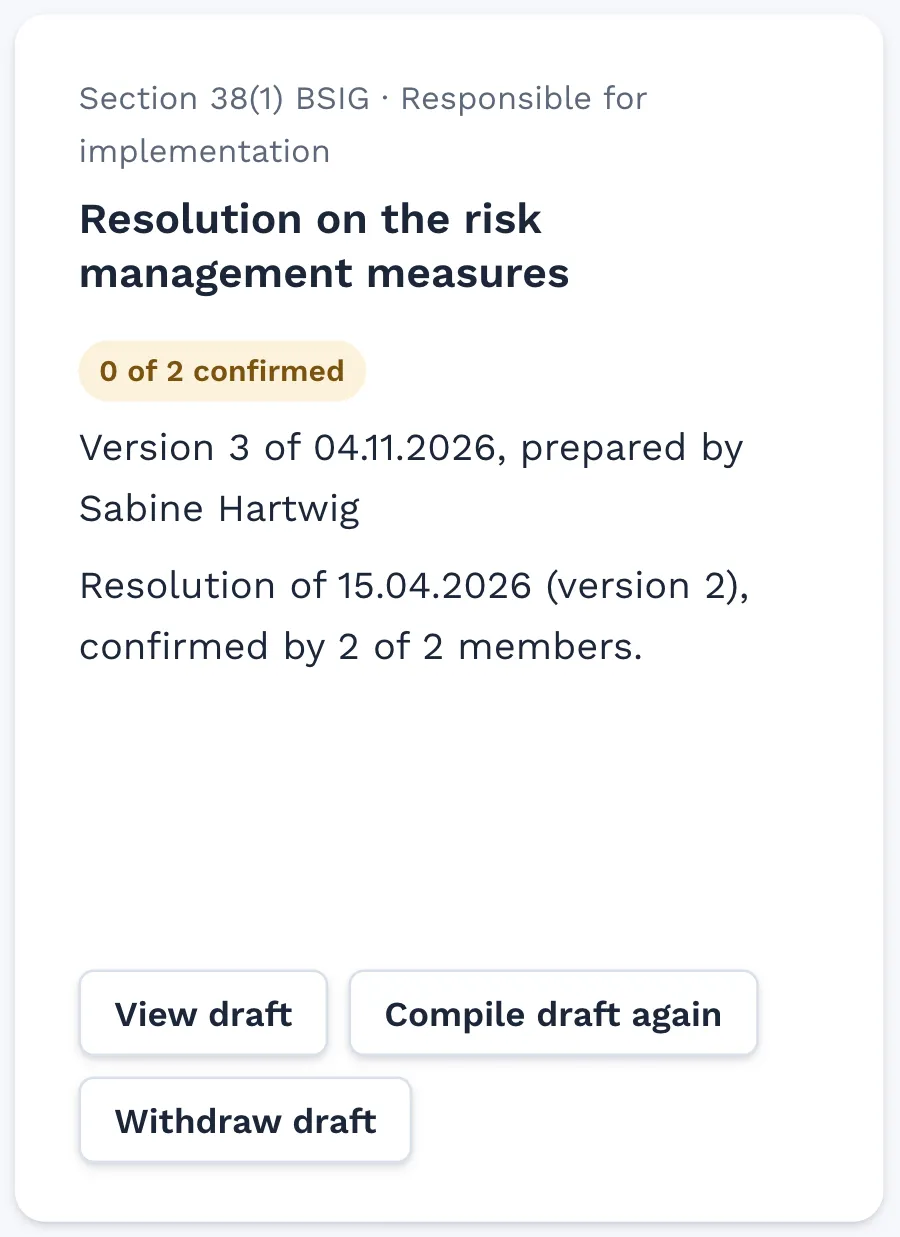
- Involve management. In the management cockpit under § 38 BSIG, management resolves on the measures, oversees implementation every quarter and proves its training. Each member confirms personally.
- Share the state. Status report and catalogues are exported as PDF and Excel, the compliance package as a ZIP with all evidence files and checksums. You invite your auditor to an audit free of charge, time-limited and with a log of every access.
Excel stays a tool for input and output: for bringing in existing lists and for exports, no longer as the place where the current state lives.
Checklist for the switch
- Applicability checked and the classification documented with reasons.
- Existing lists collected: measures, policies, assets, suppliers.
- An owner and a review cycle set for every measure.
- Evidence assigned to the matching requirement, expiry dates of certificates recorded.
- Open points created as tasks with owners and due dates.
- Important suppliers classified and invited to a self-assessment.
- Incident procedure set: who checks the reporting duty and who reports.
- Management resolution and oversight planned, training scheduled.
- Decided which reports management, customers and auditors receive.
- The old spreadsheet marked as replaced, so only one state applies.
Frequently asked questions
Is there an Excel template for NIS2?
For a first inventory, a spreadsheet with the minimum measures under § 30 BSIG is a usable start. For ongoing work it lacks reminders, approvals, versions and the link to the evidence. In Complass the catalogue for § 30 BSIG is already set up. You bring in your existing spreadsheet by import; the import template is available as an Excel or CSV file.
Do we still get our data as an Excel file?
Yes. Status report, catalogues and action plan are exported as Excel files, the management report as a PDF and also as an Excel file.
Does Complass submit reports to the authority?
No. Complass calculates the deadlines and prepares the content. You submit the report in the reporting portal and record the time and reference number in the incident.
Do I also need ISO 27001?
The BSIG does not require certification. ISO/IEC 27001 is a proven framework, though. In Complass you link both catalogues so that evidence counts for both.
We supply an affected company. Does NIS2 concern us?
Not directly, if you do not fall under § 28 BSIG yourself. Your customers do, however, have to consider supply chain security and often ask for evidence. You can provide it in a structured way with Complass, for example via ISO 27001.
In a demo we show you how measures, evidence, suppliers and incidents come together in Complass.
Request a demo Try it for 14 days
Read more
- Whitepaper "NIS2 for companies in every sector: directly in scope or via your customers"
- NIS2 and the BSIG in Complass: applicability, duties and implementation
- Compliance management: catalogues, action plan and evidence
- Incident management: record incidents and check the reporting duty
- Supplier management: self-assessments and evidence from your suppliers
- Free applicability check
Not legal advice. This guide gives a general overview and does not replace an assessment of the individual case.